

 Back to all blog posts


The retina is a highly specialized, multi-layered neural tissue responsible for vision, and its accurate segmentation is crucial for studying both normal and pathological conditions. Establishing an AI-driven segmentation model for a normal rat retina lays the foundation for analyzing diseases like glaucoma-induced retinal atrophy and other degenerative diseases in the future.
This blog outlines simple steps in creating an AI model using Aiforia® Create, Aiforia’s versatile AI development tool for image analysis. For a more detailed description of the process, download our whitepaper: Creating a veterinary pathology AI model
(Disclaimer: Creating an AI model is not rocket science, and even a veterinary pathologist, like me, can do this).
Step 1: Plan the AI model
Before beginning the model development process, it is essential to define clear objectives and establish a structured approach and a ground truth.
In this example, the AI model should be designed to:
- Accurately segment retinal layers (e.g., ganglion cell layer, inner nuclear layer, outer nuclear layer, and retinal pigment epithelium).
- Identify and quantify key retinal cell types, including cell bodies of ganglion cells, bipolar cells (also Müller and Amacrine), and photoreceptors.
- Exclude non-retinal tissues from quantification.
Step 2: Collect data for training
The next step is to obtain histological images to train the model. The dataset should include high-quality histologic sections with consistent staining and section quality. In addition, section orientation, staining, and scanner should be consistent and reflect future data sets.
With limited variation in staining and samples (animal breed/species, age, etc.), 50-100 WSIs are usually recommended to construct a basic model that is generalizable to your needs (will be suited to the analysis of new material).
The histological slides must be digitized using high-resolution whole-slide scanners. To ensure uniformity:
- Images should have consistent brightness and contrast to minimize variability.
- Sections should ideally be free of artifacts such as tissue folds or uneven staining.
- Images should be formatted for compatibility with Aiforia® Create (e.g., TIFF, SVS).
Step 3: Annotate
The model is designed to differentiate the features we call classes. A tissue area is usually the first class added, which segments (semantic) from the slide background. This speeds up analysis, as the background is ignored and won’t be analyzed further. The next layer in the model tree design would segment the retinal from all non-retinal tissues, which won’t be analyzed further. Essentially, this is carried on to segment the different layers of the retina.
Using Aiforia® Create, researchers can manually annotate images by outlining each retinal layer with precise boundary markers and labeling individual cells based on morphology and location. Alternatively, after the model has undergone some training, you can utilize Aiforia’s Annotation Assistant. This feature suggests potential examples of features and backgrounds, allowing the user to review and select them.
Two types of annotations need to be added to train the segmentation features:
- Training annotations: used to specify the class or classes of interest (e.g., retina vs non-retinal tissue)
- Background annotations (those you want AI to ignore): These are drawn with only a training region (the portion of the image on which the convolutional neural network, CNN, is trained).
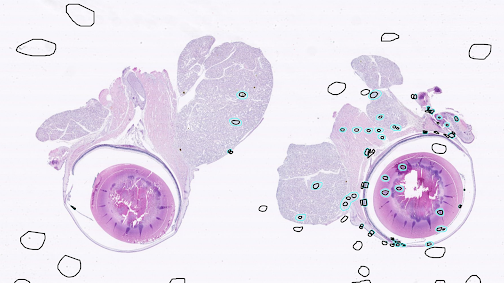
An example of annotations for tissue and non-tissue
Step 4: Train the model
As we develop the model by adding annotations, we need to initiate frequent periodic training to enable the CNNs to learn the features. This process doesn't have to be completed all at once—you can focus on one feature at a time. This approach makes the process more manageable, allowing analysis results to be isolated from parent layers rather than splitting projects into separate features and later recombining them. The best approach is to add some annotations and then train, analyze, and review. This helps you to see whether your annotations have improved the model quickly.
When you train a model, you define how many iterations you want to use. Iterations determine how much time you give the AI to learn the features; the longer the training time, the more it will look for examples. Once you have completed training rounds, you can use the model to analyze the tissues for performance (are there areas not identified in the analysis or false positive or false negative results) and verify if your annotations agree with model analyses.
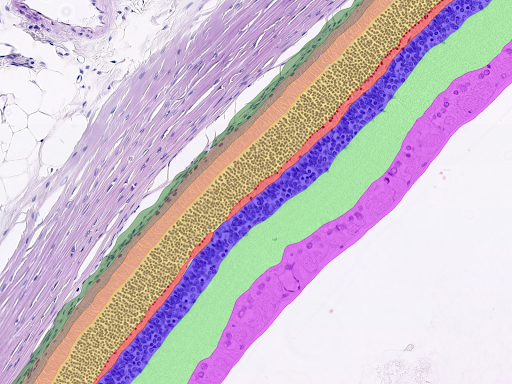
Retinal segmentation layer results
Step 5: Validate
After sufficient AI model performance is achieved (visually and through annotation verification), the AI model is usually validated against external human validators before being used to analyze future image datasets.
The first step is visual validation (“pre-validation”), which means you need to run an image analysis on 5-10 slides that were never used during AI model training.
- If the AI model performs well, you can use it for image analysis.
- If the AI model fails, add more images to your AI project, provide training annotations, and train a new AI model that will also generalize to the new images.
Once the model performs well according to your pre-validation, you can use Aiforia’s built-in validation tool to invite external moderates to give validation annotations, which you can then compare against your AI model performance. Learn more about this feature here.
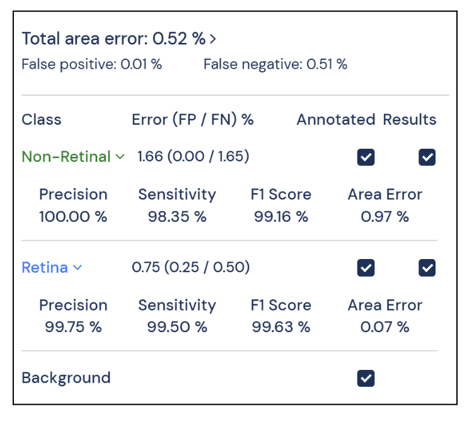
Verification and validation results for our model
Step 6: Ensure model quality and future scalability
The AI model should be periodically tested with new samples to ensure consistency, and its performance should be re-evaluated whenever new staining methods or improved imaging technologies are introduced. If you are interested in quality control, view more best practices from our whitepaper “Best practice guide to ensure quality and long-term success using artificial intelligence to analyze digital pathology slides”
Once the AI model is validated for normal retinal segmentation, like in this example, it could then be used as a basis to expand to include glaucoma-induced changes, such as thinning of retinal layers (notably the ganglion cell layer and inner plexiform layer). This requires analyzing pathologically affected tissues with the current validated model. Then, the model must be fine-tuned with further annotations to include the new pathology in any needed new data.
→ For more detailed step descriptions, along with images, download the whitepaper: Creating a veterinary pathology AI model